
Trials
Length: Development Start Sept 24
Introduction
Technical Design/Combat Design
This page will act as a pseudo Game Design Document. This page will be constantly updated when anything is changed or added. Dates will be posted on each mechanic to signal when they have been changed/added.
With this personal project, I challenged myself to recreate free-flow combat seen in games such as The Batman Arkham Series and The Spiderman PlayStation series
I also decided to implement mechanics seen in games such as God of War (2016) including focused combat and individual stun meters
What I want to achieve is the feel of taking on a thousand opponents at once. I want to get this by having chaotic encounters where every enemy will attack at once, but I wanted controlled combat where recognizing at least one of these attacks and responding will deflect every other attack that comes whether that's through an unstoppable barrage of attacks or a few precise pokes through untouchable movement, or when the player masters it, both options.
The Core Pillars of Gameplay
Chaotic Encounters
Unstoppable Attacks
Controlled Combat
Untouchable Movement
FreeFlow Combat
Added Sept 26, 2025

In this demonstration, I created a free-flow combat system using the Blueprint visual scripting.
Taking inspiration from the Arkham Series and the Spiderman PlayStation games, I created a system that allows the player to bounce between enemies.
Using the X and Y inputs to create a 360 value input for the player to enemy detection I made an optimized system that allows for traces to be made solely from the player.
Blueprint Graph

Combos
Added Oct 4, 2025

Purpose (Unstoppable Attacks)
For this mechanic implementation, I wanted to add a little extra variety in standard combat similar to the God of War games.
Utilizing 2 buttons I created a combo system that allows for 4 different combo strings to be used. These combo strings can also be blended into each other allowing stylish creativity.
Blueprint Graph

Lock-On
Added Oct 12, 2025

Purpose (Controlled Combat)
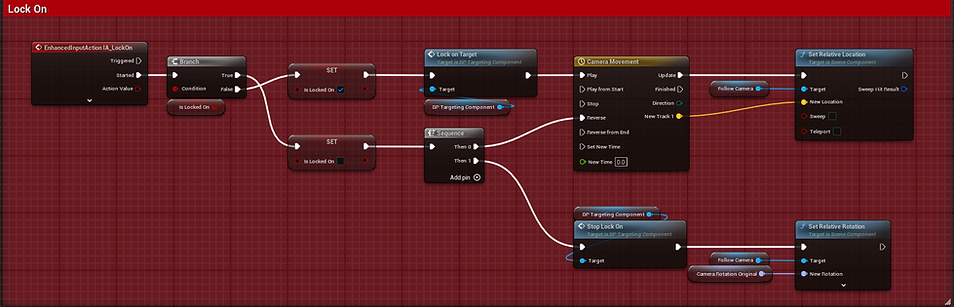
I added the ability to lock onto specific targets. This allows for more control on the player to target specific enemies.
I plan on creating different enemy types such as brutes which are easier to take down when you lock onto them. Similar to the Beat-Down combo in the Arkham series but more controlled in execution similar to God of War.
Utilizing an actor component, I was able to create a lock on system that can be moved between different iterations of a player character
Blueprint Graph
Enemy/Wave Spawner
Added Oct 16, 2025

I created a simple spawner for enemies that can either activate once or activate under certain conditions
Blueprint Graph

Individual Limbs Traces
Added Oct 25, 2025
Implementation
Utilizing both skeleton sockets to create traces lined with the player character's arms and Animation Notifs, I was able to label individual attacks and activate the correct blueprints based on which limb was being used. I also added smaller features such as Heavy vs Light attacks and a limbs attack direction to call for different animations depending on the classification
This allowed for a very precise calling of traces for certain attacks and specifications on which direction the attack is coming from and the type of attack. This also works for animations that have more than 1 attack animation implemented such as the double kick.
Purpose (Controlled Combat)
When deciding on how combat should feel for the player, I wanted every hit to feel accurate to enemy reactions. I decided to have the attack hitbox match the limbs being used to attack.
There are different Blueprints with this same code but pertaining to each limb
Blueprint Graph

Stun/Execution Mechanic
Added Nov 8, 2025 (Stun), Nov 14, 2025 (Execution)

Implementation
The implementation of the stun itself was pretty simple. Since I had an event that pulled the attack data from the player to the enemy, I added an extra point that took in Stun Damage.
I then took this data and created an event that checked whether the stun meter was full. When it was full, the enemy played an animation where it looked stunned. In this state when AI is implemented, the enemy would be immobilized until either the stun bar drained or the player performed an execution.
Utilizing Motion Warping to create accurate animation positioning while pulling player data to determine whether they are in front or behind allowing for different animations.
Purpose (Unstoppable Attacks)
When deciding on why I should add the stun mechanic, I wanted to provide a different dynamic to free-flow combat. What I wanted was for the player to feel like the individual enemies they are fighting are growing more weak as they continue to be aggressive. This is inspired from God of War (2018) with encounters such as the Valkyries where this stun meter rewards aggressive but precise play. Too aggressive and the player will trip over themselves, not aggressive enough and the player will not be rewarded.
What this allows for is rewarding of skilled players without severely punishing lesser skilled players.
Blueprint Graph

Aim Assist Camera
Added Nov 20, 2025

Implementation
When implementing this camera system I wanted to get the World Positions of each enemy in front of the player and average them to a central point. In the video the green dot is the visual representation of this average.
Taking this average I used a Rotation Interp to Constant for so that I can control strength of the aim assist.
Purpose (Controlled Combat)
In initial tests, I found that I had to shift my focus off the combat and move my camera whenever it would face away from the majority of enemies. While it may sound like direct control of the camera sits with the pillar of Controlled Combat, in reality it shifted focus from the actual encounter.
To counter this I created a camera system that focuses the player on the majority of enemies.
Blueprint Graph


Heavy Attacks
Added Dec 15, 2025

Implementation
When implementing this mechanic, I had to rebind a few nodes in my attack mechanics. Utilizing the Triggered node to act as a build up for the heavy attack, I set it so that the player will enter a heavy attack stance after holding the attack button for a little under a second.
Purpose (Controlled Combat)
This move's purpose is to counter an enemies block state. Currently I do not have a block state implemented yet but this move will be the one to counter this.
Blueprint Graph

Slow Motion Execution and Attack Effects
Added Nov 25, 2025

Implementation
When I implemented the execution camera animation I used the Attach Component to Component with a separate camera boom specifically for the execution animations. I set the location/rotation/scale rules to keep the World values and not relative values then I used a Move to Component to ease the camera into the spots. Then when after the animation finishes, the camera returns to its normal position.
Purpose (Controlled Combat)
When watching over recordings of combat I noticed that the times I used the execution, I did not notice the times I had used it. For someone who knows that they are in the game, I decided to implement a feedback where the camera moves closer making the move look more cinematic.
Blueprint Graph

Sprinting
Added Dec 15, 2025

Implementation
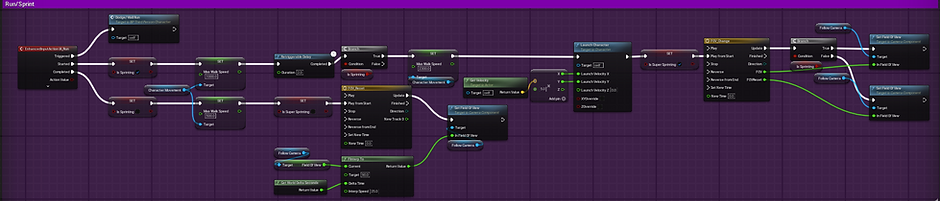
The implementation of this mechanic was easy. Just simply changing the max walk speed and adding a launch function after a few seconds of running I was able to create a running system similar to DMC and Prototype
Purpose (Untouchable Movement)
Taking inspiration from the Prototype series, I wanted to add a form of movement into the game outside of combat so I implemented a sprint system into the game.
Blueprint Graph
Wall Running
Added Dec 15, 2025
Implementation
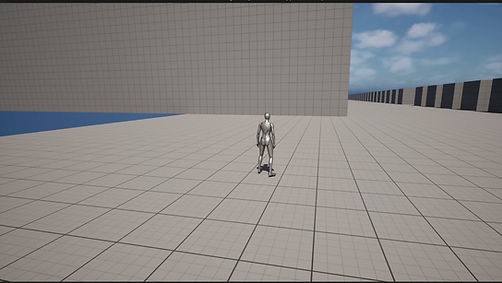
The implementation of this mechanic involved a line trace that gets the angle of the wall and converting that into the Gravity Direction node. Whenever the player is on the wall, a new trace is made under the player to insure that they are on the wall still. When it detects that they are off the wall, it resets the Gravity direction
I plan on adding a system that allows the player to switch between walls on the same building similar to Spiderman. That is not yet implemented but will be in the near future.
Purpose (Untouchable Movement)
Taking inspiration from other games such as Spiderman, Prototype, Hulk, etc. I wanted to add another movement option that allowed the player to freely roam the world so I implemented a wall run system.
Blueprint Graph

Side Wall Running/Wall Jump
Added Dec 18, 2025

Implementation
The implementation for this was pretty simple. simply recreating the same mechanic for the Wall Run but have the line trace come out either left or right of the player.
Wall jump was also simple. Just adding an extra launch velocity depending on the wall the player is standing on allowing them to launch away from said wall.
Purpose (Untouchable Movement)
Taking inspiration from the Spiderman games, I wanted to give extra control to the player when it came to wall running. Allowing the player to wall run from any angle and jump to other platforms allows for more maneuverability
Blueprint Graph

Wall Running Ledge Jump
Added Dec 18, 2025

Implementation
Utilizing the line trace from the Wall Running, I was able to set up another line trace to detect the upper layer of a wall. Using the location of the player and the top of the wall I used the difference in distance to gauge a spot to move the player to and launch them similar to the Web Zip Launch from the Spiderman games
Purpose (Untouchable Movement)
Taking inspiration from the Spiderman games, I wanted to give extra control to the player when it came to wall running. Instead of running and flying straight up, when timed right the player can press the jump button before reaching a ledge when wall running to boost them forward over the wall.
Blueprint Graph

Wall Running Boost
Added Dec 18, 2025

Implementation
The implementation was simple. By adding a boost whenever the player taps the jump button I was able to create a boost similar to the Web Zip mechanic from Spiderman
Purpose (Untouchable Movement)
Taking inspiration from the Spiderman games, I wanted to give extra control to the player when it came to wall running. Allowing the player boost their speed allowing for blistering speeds
Blueprint Graph

Bugs/Problems
Updated Dec 15, 2025
Character not locking on/Trace not Working (Solved)
When creating the trace initially, I had trouble utilizing the input systen. Because the input was a simple X and Y value pulling between 0 and 1 as the value, I had a hard time creating a blueprint that creates a trace depending on both input and player location
Solution Oct 23, 2025
I ended up learning how to do trigonometry to achieve the results I wanted. Grabbing the 2 results and converting them into an Arc Tangent 2 and then converting that into Radians. Then I took that value and converted it through either a Cos Sin or Sin depending on the direction of the joystick (The X and Y values). This allowed for my trace to follow the direction of the joystick.

Corrupted Files

When creating the mechanic for Executions, I had ran into a problem regarding the mesh. When creating reference meshes within the enemy asset my engine had crashed. Jumping back in with an attempted restore, the base mesh for the enemy had corrupted. Anytime I had dragged an asset related to the enemy into the editor it crashed. I was devastated as I had last at least 2 weeks worth of work.
Solution Nov 14, 2025
I ended up needing to recreate the enemy from scratch, but luckily I had the basic idea on the enemy in my head already so recreating it only took me a few days. This included all of the references from other assets that needed to be replaced as well.
Average of the Enemy Location not saving
When creating the Aim Assist system, I had ran into a problem where I was unable to save the individual locations correctly. Since this action is done on Event Tick, the individual locations would be saved and changed every tick. This meant that every time the locations were added together from the Multi-Sphere Trace, they would end up adding indefinitely.
Solution Nov 20, 2025
I had to change a few things when approaching this problem. First I wanted each time the code was executed for a new set of vector data points to be acquired. That meant the previous values would be replaced. In order to do this I created a variable that kept the value for the total of all the vectors. Once the code was done executing, it erased the values.
In this system I had to implement the scripting for the camera movement between when the values were acquired and when they got deleted. After that implementation I had to execute the code only if 1 of 2 conditions are met. Either if the player was moving or if they were attacking. Then I checked if the trace came back true if it detected an enemy. This allowed for camera movement only if the player is active preventing any weird camera movements when the player was AFK (Away From Keyboard/Controller)

Death in the Family

It has been awhile since my last update, nearly 3 weeks. Well this is because I had recently lost my Great-Grandma. The week after I did my last update, I had gone out of town for Thanksgiving. I had been gone for a week so I had not had a chance to work on this project. Coming back I went straight back to work (Night-Time job) and planned on working on this project mid way through the week. It was around this time that I got the news about my Grandma. I was gone for another week out of town. I didn't know her well, but she meant something to my mom so it meant something to me.
Coming back this past week I pushed myself to work even harder to make up for lost time. So I have implemented 3 new mechanics into the game.
I have experienced loss all of my life and games with my friends are what helped me through those hard times. I want to be apart of that process and bring games to people who need them just like how I did.
Ledge Jump Stump
When creating the Ledge Jump mechanic, I hade a lot of problems trying to get it right. I went through at least 5 different iterations of it before landing on what I have now. Each one had their strengths but ultimately had glaring weaknesses. Some iterations had too much spaghetti code and was extremely hard to piece together. Some grabbing certain pieces of information was not possible with what I had. Other times it was too janky, stiff, or at times nauseating.
Solution Dec 18, 2025
I ultimately went with an iteration that is both simple in code and smooth in execution. While there is still some tweaking to be done, What is currently up is the best that I have at the moment
The picture currently used represents multiple mechanics used in wall running.

Planned Additions
This section is a list of features I plan on adding into the game.. This is not a final list and some feature may be cut due to conflictions in design. This is also not limited to currently created features. Ordered based on priority